Showing posts with label web. Show all posts

Sunday, November 20, 2016

Build a Web Proxy in Amazon EC2

Prerequisite:

  • I already have an amazon ec2 instance (ubuntu) running in the cloud

What I do:
  • I choose to install tinyproxy
    • command: sudo apt-get install tinyproxy
  • Setup the IP you allowed for using the proxy
    • sudo vim /etc/tinyproxy.conf
    • unfortunately, tinyproxy does not support user authentication with username and password
  • Restart tinyproxy
    • sudo /etc/init.d/tinyproxy restart
  • Then you can setup your chrome to use the web proxy
    • it requires the IP address of your amazon ec2 instance and port (tinyproxy default port 8888) in setting up the web proxy


Comments:

  • With this proxy, you will be able to have free internet even if you are in a country with Internet censorship

Wednesday, January 20, 2016

Session

Definition

A session is a semi-permanent interactive information interchange between two or more communication devices.


Implementation

The session is implemented by means of a database with information about the state of each session.

The reason of not implementing it with multiple processes or threads is due to large resource overhead.


Cluster of Servers

When a client may connect to any server in a cluster or servers, it is important to maintain consistency.

The client must be either directed to the same server for the duration of the session, or the servers must transmit server-side session information via a shared file system or database.


Client Side Web Sessions

Client-side sessions use cookies and cryptographic techniques to maintain state without storing as much data on the server. 

When presenting a dynamic web page, the server sends the current state data to the client (web browser) in the form of cookie. The client saves the cookie in memory or on disk. 

With each successive request, the client sends the cookie back to the server, and the server users the data to "remember" the state of the application for that client and generate an appropriate response.


Issues

  • Browser limits the number and size of cookies that may be stored by a web site.


HTTP Session Token

  • A session token is a unique identifier that is generated and sent from a server to a client to identify the current interaction session. The client usually stores and sends the token as an HTTP cookie and/or sends it as a parameter in GET or POST queries. 
The reason of using session tokens is that
  • The client only has to handle the identifier
  • All session data is stored on the server (usually in a database).


Saturday, January 9, 2016

Web Applications Client & Server


Figure 1 [1] illustrates the web application architecture in the server side and client side.

Server Side

  • Logic Layer
    • Implements the application business logic using high-level programming languages, such as Java, PHP, or Python. 
  • Web Server Layer
    • Receive HTTP request, and passes the request to the appropriate server-side program, e.g., Apache web server, Windows IIS, or Nginx.
  • Data Storage Layer
    • Stores the web application state and user data. Popular data storage systems are traditional SQL databases, which include MySQL, PorsgreSQL, or MSSQL
  • Infrastructure Layer
    • Runs the operating systems. An infrastructure could be a physical machine or virtualization platform which manages multiple virtual machines. 

Client Side

The client side receives HTTP response from the server-side, and the job of the client is to convert the HTML contained in the HTTP response into a graphical interface from the user. 


  • Logic Layer (Presentation Layer)
    • It is written in a combination of HTML, CCS, and JavaScript, with JavaScript providing a way for the sever-side code to execute application logic on the client

  • Browser 
    • Retrieves the presentation layer code from the server, interprets it, and presents it as a graphic interface to the user. 

  • Storage Layer
    • For the presentation layer code to store data. Available storage methods include cookies, local storage, IndexedDB, and File APIs.
  • Operating System Layer
    • Runs the browser


Reference
[1] Toward a Moving Target Defense for a Web Applications, by Marhony Taguinod, in International Conference on Information Reuse and Integration 2015

Sunday, December 27, 2015

Web Service -- REST

What is REST

  • a design pattern for implementing networked systems, stands for "Representational State Transfer"
  • A client references a web resources using a URL
  • The web serves as a guiding framework for the web
  • HTTP is not just a protocol
    • It provides an API (POST, GET, PUT, DELETE) for create, read, update, and delete operations on a resource
  • Approach isolates application complexity at the end points (client and server) and keeps it out of the transport

Three Fundamental Aspects of REST

  • Resources
    • Every distinguishable entity is a resource. A resource may be a web site, an HTML page, and XML document etc.
  • URLs
    • Every resource is uniquely identified by a URL.
  • Simple operations


REST vs. SOAP

REST

  • The web is the universe of globally accessible information
  • Resource oriented
  • User-driven interactions via forms
  • Few operations (generic interface) on many resources
  • URI: Consistent naming mechanism for resources
  • Focus on scalability and performance of large scale distributed hypermedia systems

SOAP

  • The web is the universal transport of message
  • Activity/Service oriented
  • Orchestrated reliable event flows
  • Many operations (service interface) on few resources
  • Lack of standard naming mechanism
  • Focus on design of integrated (distributed) applications


Web Service

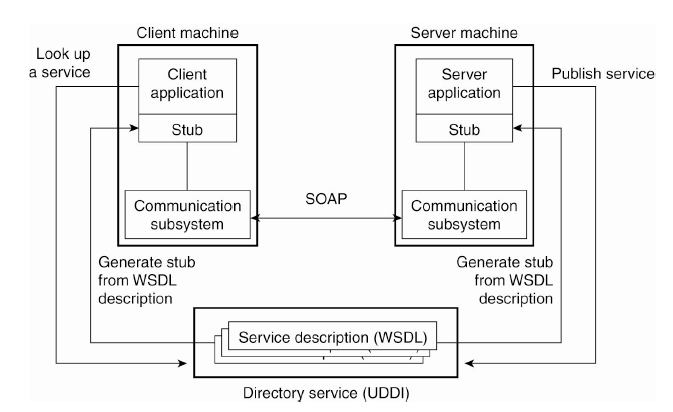
Web Services Fundamentals


Two Competing Approaches

  • REST-style
  • SOAP-style


Four Fundamental Technologies

  • XML
    • Describing information sent over the network
  • WSDL
    • Defining web service capability
  • SOAP
    • Accessing web services
  • UDDI
    • Finding web services

Web Service Infrastructure and Components


XML

  • Has emerged as the standard solution for describing information exchanged between heterogeneous system
  • Can be read by programs and interpreted in an application-specific way
  • Example
    • <Account>xx</Account>

WSDL: Describing the web service

  • Provides functional description of network services
    • IDL description
    • Protocol and deployment details
    • Platform independent description
    • Extensible language
  • As extended IDL: WSDL allows tools to generate compatible client and server stubs
    • Allows industries to define standardized service interfaces
    • Allows advertisement of service descriptions, enables dynamic discovery and binding of compatible services
      • Used in conjunction with UDDI registry
  • The main elements in a WSDL description

UDDI: Finding Web Service

  • Universal Description, Discovery, Integration
  • UDDI defines the operation of a service registry
    • Data structures for registering
      • Business
      • Technical specification: tModel is a keyed reference to a technical sepcifcaiton
      • Service and service endpoints
        • Referencing the supported tModels
  • The main UDDI data structures


SOAP

  • Why SOAP
    • A "wire protocol" necessary for accessing distributed object services
    • Vendor and/or platform-specific wire protocols hinder interoperability
  • SOAP
    • An Internet standard specification, the goal of which is to define a platform and vendor-neural WIRE PROTOCOL based on Internet standard protocols [HTTP & XML] to access Web Services. 
  • Features
    • Uses XML to package requests for services exposed by Web Services, and responds generates by Web services
    • Typically uses HTTP as a transport protocol
  • SOAP message
    • Convey documents
    • Support client-server communication


RESTful Approach

  • Focus on using HTTP operations (GET, PUT, POST, DELETE) to manipulate data resources represented in XML
    • No WSDL + SOAP

Sunday, December 6, 2015

浏览器输入URL后会发生什么

Reference
[1] http://weibo.com/p/1001603820890600125943


Overview

1. 客户端本地向DNS服务器请求把URL转换为IP地址
2. 从客户端到服务器IP建立一个TCP连接
3. 若需要加密,则需要SSL/TLS握手,其中涉及到CA
4. 由客户端向服务器发起HTTP请求
5. 服务器dump出内容,及HTTP response发送回客户端


Details

服务器
1. reverse proxy: 
  • act as load balancer; 
  • it will be placed to be closed to clients to reduce the latency
  • it will more I/O consuming, not CPU consuming
2. 前端服务器
  • 用来跑网页中的一小部分
  • 前面那层前端一般用来组合这些pagelets
  • 目的: 快!
3. 后端
  • 用户数据
  • 缓存,memcached, not persistent, fast!
4. CDN
  • 用来存储图片,视频等大量资源
  • 需要靠用户近,以此提速
  • 著名CDN:Akamai


Friday, November 6, 2015

反盗链 (Anti-Leech)

Reference
[1] Apache 防盗链(Apache Anti-Leech)技术的简单实现
[2]web网站防盗链技术_八种常见的防盗链方法总结


1. 判断引用地址

  • 使用 rewrite 技术实现 Apache 防盗链
  • 通过refer变量的值,判断图片或者资源是否合法
    • 缺点: refer可以被伪造

2. 使用cookie
  • 其实这种方法原理上跟方法2差不多。就是在显示“下载”链接的页面里产生一个动态值的cookie,然后在处理资源下载请求时先判断cookie里有没有正确的cookie,如果没有则返回错误提示信息。至于这个动态值如何产生,只要能逆向判断动态值是否合法的都可以,例如将当前的时间去除秒数取哈希值(也叫散列值)。如果网页程序是asp.net则更简单,可以往Session里随便存一个字符串或数字,然后在处理下载请求时先检查Session里是否存在这个字符串或数字。
    • 缺点
      • 无法使用下载工具

3. 使用动态文件名
  • 也叫动态钥匙法,当用户点击一个下载链接时,先在程序端计算一个Key(使用一定规律产生的Key,最好不要使用随机字符串例如GUID,并且这个Key必须有一定时效的),然后在数据库或Cache里记录这个Key以及它所对应的资源ID或文件名,最后让网页重定向一个新的URL地址,这个新URL地址里需要包含这个Key。当浏览器或下载工具发出下载请求时,程序先检测这个Key是否存在,如果存在则返回对应的资源数据。
  • 使用这个方法的好处是下载工具也可以下载,并且在Key失效前可以断点续传,并且可以通过Key来控制下载的线程数。
  • 使用这个方法(包括以上所有支持下载工具的方法)的缺点是:当任意一个用户下载成功之后,你的资源就会被一些下载工具列入“资源候选名单”,以后其他人在其他地方下载同样的文件时,下载工具会不断连接你的服务器,即使你的文件已经删除或者Key已经失效了,
    • 这样会造成类DDos攻击的后果,下面再介绍两个即可以让下载工具下载,又可以防止盗链的方法。

4. 擅改资源的内容
  • 一般热门的资源都是电影、mp3、较大的压缩包等,这些文件都是有很多可以插入数据的地方的,例如mp3有一个tag区,rar/zip有一个备注区,电影的内容随便一个地方,只要在下载过程当中,动态地往这些地方注入一些随机的字节(几个字节即可),就可以达到让整个文件的哈希值(即散列值、指纹值)发生改变,让从你网站下载的文件的哈希值跟别人的不一样,就可以防止下载工具主动找上门了。用这个方法配合方法6,可以达到较好的防盗链的效果。缺点是,虽然文件被修改的部分不会被“看”、“听”出来,不过多多少少让知道的人觉得不爽。另外就是如果别人把从你网站下载的文件放到其他网站,那么仍然存在下载工具主动找上门的情况(虽然实际上它下载不了内容)。